Timeline Component Design
I created this component because Work History and Education History are both displaying very similar content (see screenshots in the Sketch section below and their designated posts).
Structure
Year timeframe
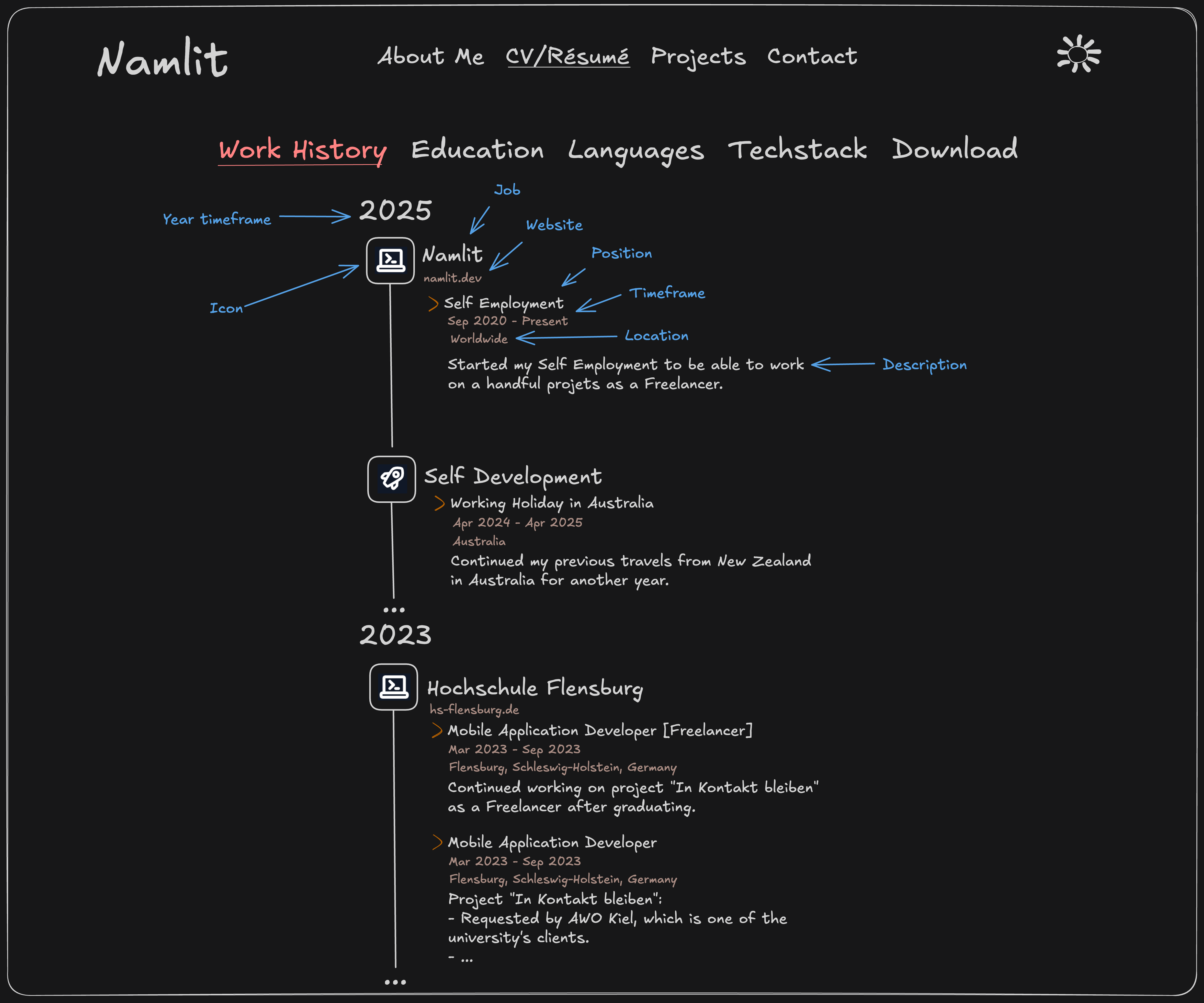
Each timeline displays the most recent year of the latest entry at the top. It shows the current year (2025) in case it is still active. The value changes if an entry is in an earlier year.
Main content
The main content is on the right side of the timeline:
- Work History: A list of jobs. Each job holds a list of positions.
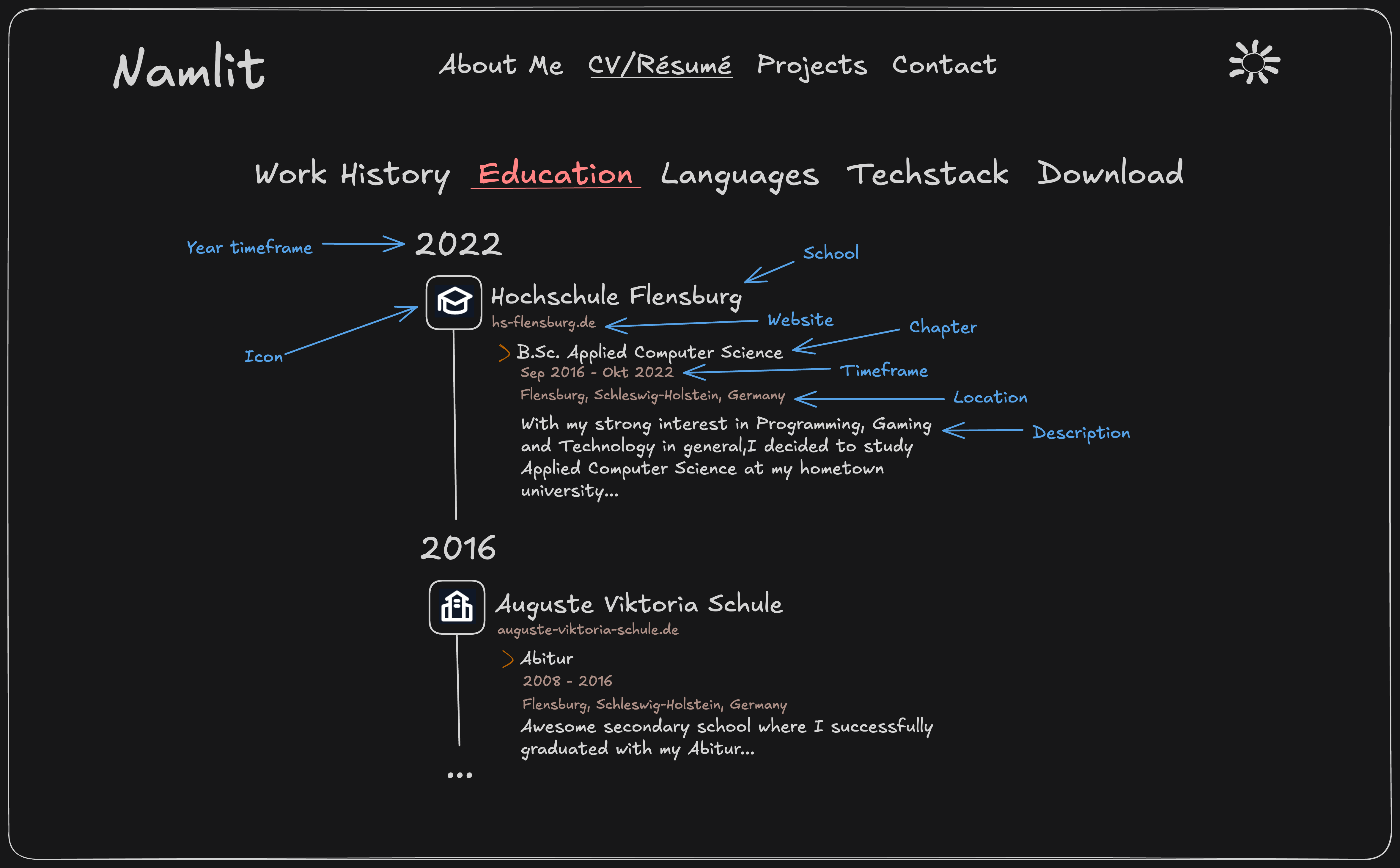
- Education History: A list of schools. Each school holds a list of chapters.
This allows for multiple positions per job in a scenario like my job at
the Hochschule Flensburg where I started as a Mobile Application Developer and continued as
a Freelancer later.
Similarly, in the education history you can have multiple degrees at the same university (e.g. bachelor + master).
Each job/school has an optional field that links to their website.
Each position/chapter has fields for the active timeframe, location and a detailed description that can display Markdown-style content.
Icons
I am using Flowbite Icons to differentiate between work categories & education types:
- IT jobs use a coding icon
- Hospitality jobs use a wine glass icon
- Universities use a graduation-cap icon
- and more...
Sketch
Work History
Education History
Mobile view
Thankfully this is pretty much identical to the desktop version on this page. I didn't have to implement anything specific for the mobile view.
Code
You will be able to find the code on my GitHub in the near future! First I have to get everything cleaned up tho before uploading v1.0.
Feel free to reach out if you have questions related to the design, coding and more anytime! I'd be happy to go over the code in my private GitLab too, while I haven't uploaded it here yet :)
I created this component because Work History and Education History are both displaying very similar content (see screenshots in the Sketch section below and their designated posts).
Structure
Year timeframe
Each timeline displays the most recent year of the latest entry at the top. It shows the current year (2025) in case it is still active. The value changes if an entry is in an earlier year.
Main content
The main content is on the right side of the timeline:
- Work History: A list of jobs. Each job holds a list of positions.
- Education History: A list of schools. Each school holds a list of chapters.
This allows for multiple positions per job in a scenario like my job at
the Hochschule Flensburg where I started as a Mobile Application Developer and continued as
a Freelancer later.
Similarly, in the education history you can have multiple degrees at the same university (e.g. bachelor + master).
Each job/school has an optional field that links to their website.
Each position/chapter has fields for the active timeframe, location and a detailed description that can display Markdown-style content.
Icons
I am using Flowbite Icons to differentiate between work categories & education types:
- IT jobs use a coding icon
- Hospitality jobs use a wine glass icon
- Universities use a graduation-cap icon
- and more...
Sketch
Work History
Education History
Mobile view
Thankfully this is pretty much identical to the desktop version on this page. I didn't have to implement anything specific for the mobile view.
Code
You will be able to find the code on my GitHub in the near future! First I have to get everything cleaned up tho before uploading v1.0.
Feel free to reach out if you have questions related to the design, coding and more anytime! I'd be happy to go over the code in my private GitLab too, while I haven't uploaded it here yet :)
Timeline Component Design
I created this component because Work History and Education History are both displaying very similar content (see screenshots in the Sketch section below and their designated posts).
Structure
Year timeframe
Each timeline displays the most recent year of the latest entry at the top. It shows the current year (2025) in case it is still active. The value changes if an entry is in an earlier year.
Main content
The main content is on the right side of the timeline:
- Work History: A list of jobs. Each job holds a list of positions.
- Education History: A list of schools. Each school holds a list of chapters.
This allows for multiple positions per job in a scenario like my job at
the Hochschule Flensburg where I started as a Mobile Application Developer and continued as
a Freelancer later.
Similarly, in the education history you can have multiple degrees at the same university (e.g. bachelor + master).
Each job/school has an optional field that links to their website.
Each position/chapter has fields for the active timeframe, location and a detailed description that can display Markdown-style content.
Icons
I am using Flowbite Icons to differentiate between work categories & education types:
- IT jobs use a coding icon
- Hospitality jobs use a wine glass icon
- Universities use a graduation-cap icon
- and more...
Sketch
Work History
Education History
Mobile view
Thankfully this is pretty much identical to the desktop version on this page. I didn't have to implement anything specific for the mobile view.
Code
You will be able to find the code on my GitHub in the near future! First I have to get everything cleaned up tho before uploading v1.0.
Feel free to reach out if you have questions related to the design, coding and more anytime! I'd be happy to go over the code in my private GitLab too, while I haven't uploaded it here yet :)
I created this component because Work History and Education History are both displaying very similar content (see screenshots in the Sketch section below and their designated posts).
Structure
Year timeframe
Each timeline displays the most recent year of the latest entry at the top. It shows the current year (2025) in case it is still active. The value changes if an entry is in an earlier year.
Main content
The main content is on the right side of the timeline:
- Work History: A list of jobs. Each job holds a list of positions.
- Education History: A list of schools. Each school holds a list of chapters.
This allows for multiple positions per job in a scenario like my job at
the Hochschule Flensburg where I started as a Mobile Application Developer and continued as
a Freelancer later.
Similarly, in the education history you can have multiple degrees at the same university (e.g. bachelor + master).
Each job/school has an optional field that links to their website.
Each position/chapter has fields for the active timeframe, location and a detailed description that can display Markdown-style content.
Icons
I am using Flowbite Icons to differentiate between work categories & education types:
- IT jobs use a coding icon
- Hospitality jobs use a wine glass icon
- Universities use a graduation-cap icon
- and more...
Sketch
Work History
Education History
Mobile view
Thankfully this is pretty much identical to the desktop version on this page. I didn't have to implement anything specific for the mobile view.
Code
You will be able to find the code on my GitHub in the near future! First I have to get everything cleaned up tho before uploading v1.0.
Feel free to reach out if you have questions related to the design, coding and more anytime! I'd be happy to go over the code in my private GitLab too, while I haven't uploaded it here yet :)
Timeline Component Design
I created this component because Work History and Education History are both displaying very similar content (see screenshots in the Sketch section below and their designated posts).
Structure
Year timeframe
Each timeline displays the most recent year of the latest entry at the top. It shows the current year (2025) in case it is still active. The value changes if an entry is in an earlier year.
Main content
The main content is on the right side of the timeline:
- Work History: A list of jobs. Each job holds a list of positions.
- Education History: A list of schools. Each school holds a list of chapters.
This allows for multiple positions per job in a scenario like my job at
the Hochschule Flensburg where I started as a Mobile Application Developer and continued as
a Freelancer later.
Similarly, in the education history you can have multiple degrees at the same university (e.g. bachelor + master).
Each job/school has an optional field that links to their website.
Each position/chapter has fields for the active timeframe, location and a detailed description that can display Markdown-style content.
Icons
I am using Flowbite Icons to differentiate between work categories & education types:
- IT jobs use a coding icon
- Hospitality jobs use a wine glass icon
- Universities use a graduation-cap icon
- and more...
Sketch
Work History
Education History
Mobile view
Thankfully this is pretty much identical to the desktop version on this page. I didn't have to implement anything specific for the mobile view.
Code
You will be able to find the code on my GitHub in the near future! First I have to get everything cleaned up tho before uploading v1.0.
Feel free to reach out if you have questions related to the design, coding and more anytime! I'd be happy to go over the code in my private GitLab too, while I haven't uploaded it here yet :)
I created this component because Work History and Education History are both displaying very similar content (see screenshots in the Sketch section below and their designated posts).
Structure
Year timeframe
Each timeline displays the most recent year of the latest entry at the top. It shows the current year (2025) in case it is still active. The value changes if an entry is in an earlier year.
Main content
The main content is on the right side of the timeline:
- Work History: A list of jobs. Each job holds a list of positions.
- Education History: A list of schools. Each school holds a list of chapters.
This allows for multiple positions per job in a scenario like my job at
the Hochschule Flensburg where I started as a Mobile Application Developer and continued as
a Freelancer later.
Similarly, in the education history you can have multiple degrees at the same university (e.g. bachelor + master).
Each job/school has an optional field that links to their website.
Each position/chapter has fields for the active timeframe, location and a detailed description that can display Markdown-style content.
Icons
I am using Flowbite Icons to differentiate between work categories & education types:
- IT jobs use a coding icon
- Hospitality jobs use a wine glass icon
- Universities use a graduation-cap icon
- and more...
Sketch
Work History
Education History
Mobile view
Thankfully this is pretty much identical to the desktop version on this page. I didn't have to implement anything specific for the mobile view.
Code
You will be able to find the code on my GitHub in the near future! First I have to get everything cleaned up tho before uploading v1.0.
Feel free to reach out if you have questions related to the design, coding and more anytime! I'd be happy to go over the code in my private GitLab too, while I haven't uploaded it here yet :)