Languages Design
Languages in a CV are usually just an enumeration of what you know and that's it.
It would be pretty pointless if I only display "German" and "English" on this page. So instead, I'm adding extra information for each language:
- Proficiency
- When I started learning (left out atm)
- Schools & Courses
- More details to point out things like a gap year for example
Sketch
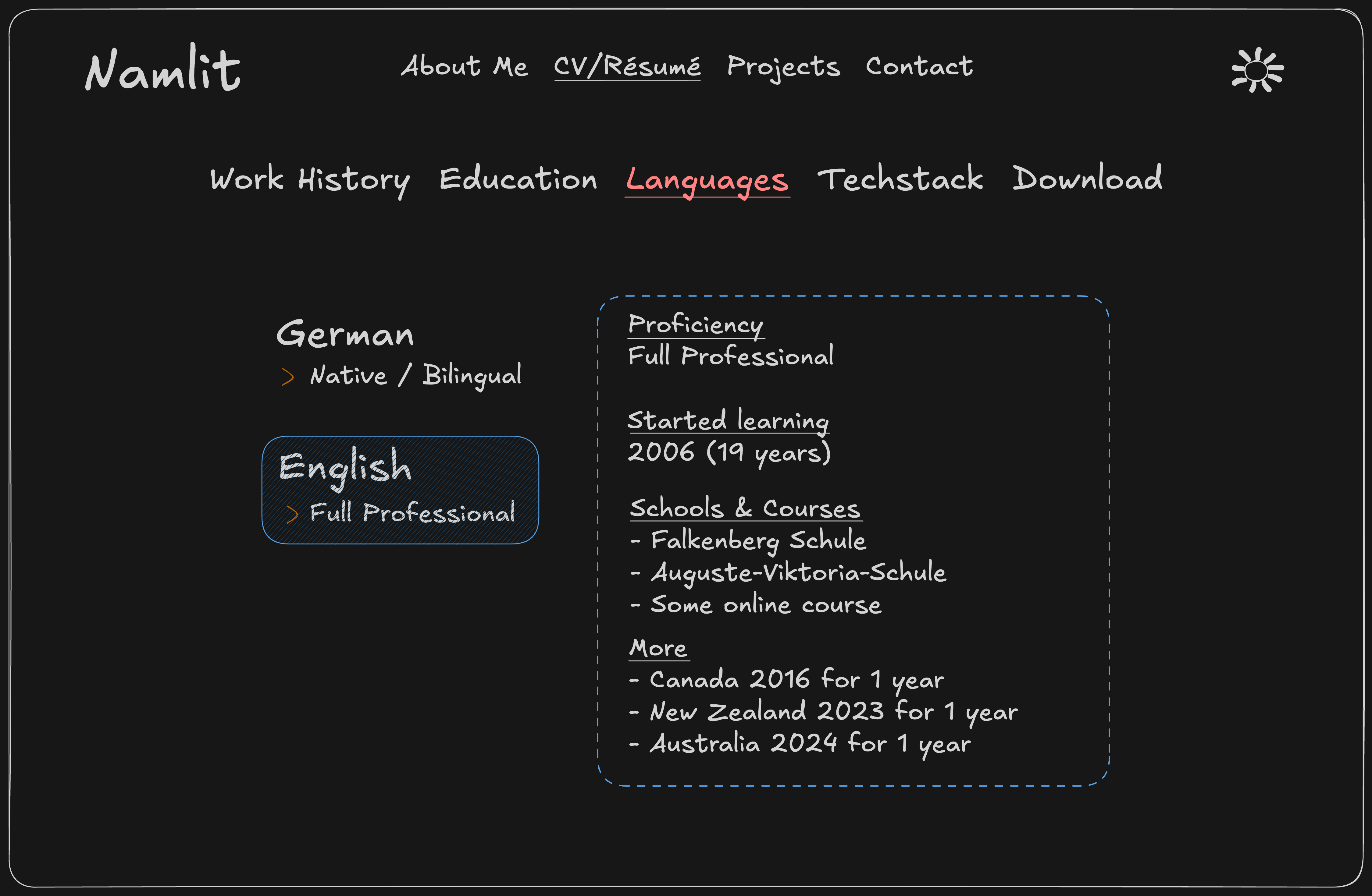
The desktop view is very similar to the one in the Techstack and Project Post. It features a Nested Navigation on the left side and displays the content in the middle:
Using a Nested Navigation isn't really necessary. But it was easy enough to implement and keeps navigation types on my website consistent!
Mobile view
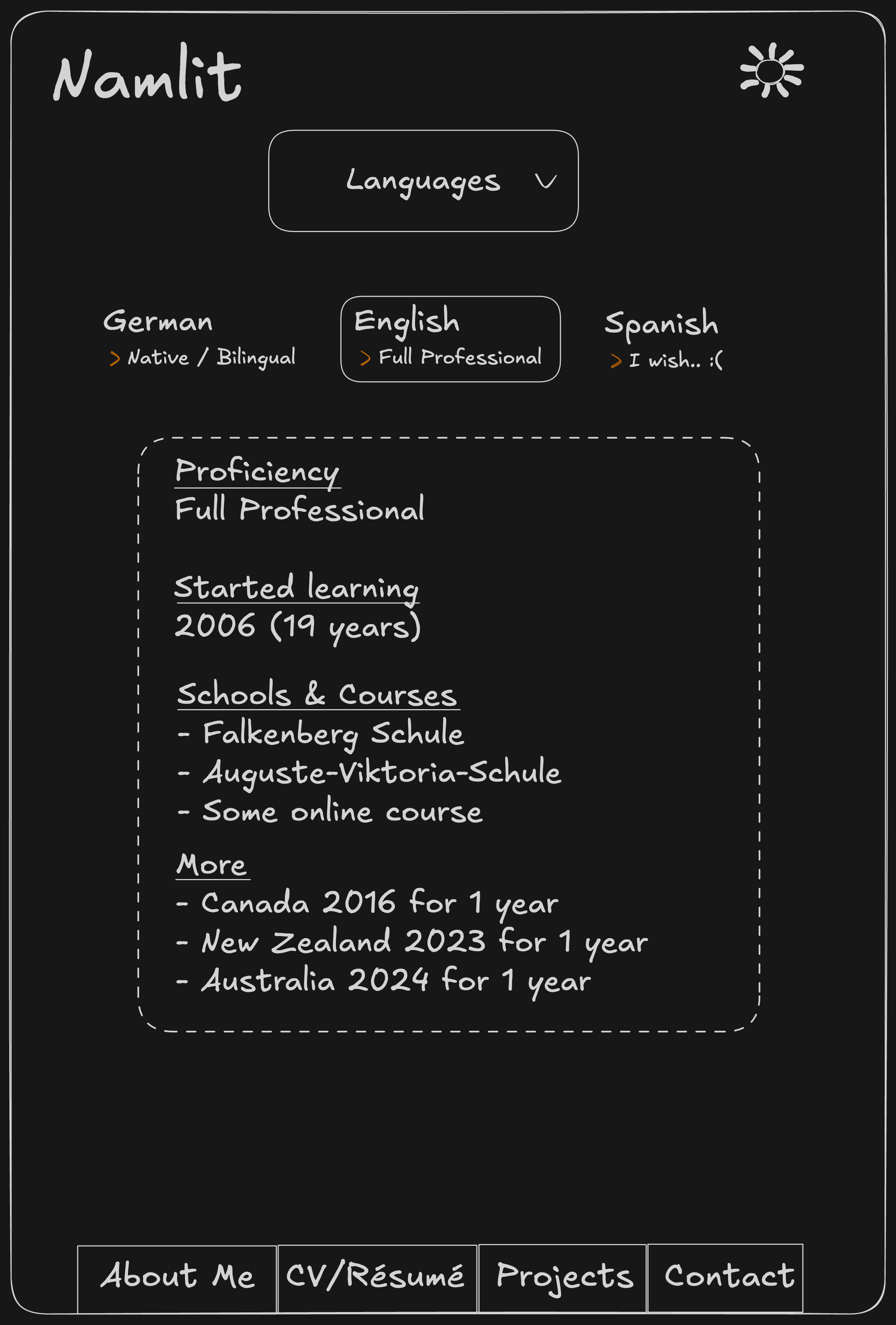
For the mobile version I had something like this in mind:
Since I only speak German and English (wish it'd be more), it is fine to have a couple buttons above the content to
navigate.
However, this would be a completely different navigation type to the other ones already implemented on the website. And
having a bunch of different navigations is a bad practice in my opinion.
Additionally, this layout causes complications if I were to extend my website with a user creation. There are some crazy people speaking 7+ languages out there. At that point, having a button-row wouldn't even make sense in the desktop view anymore :D
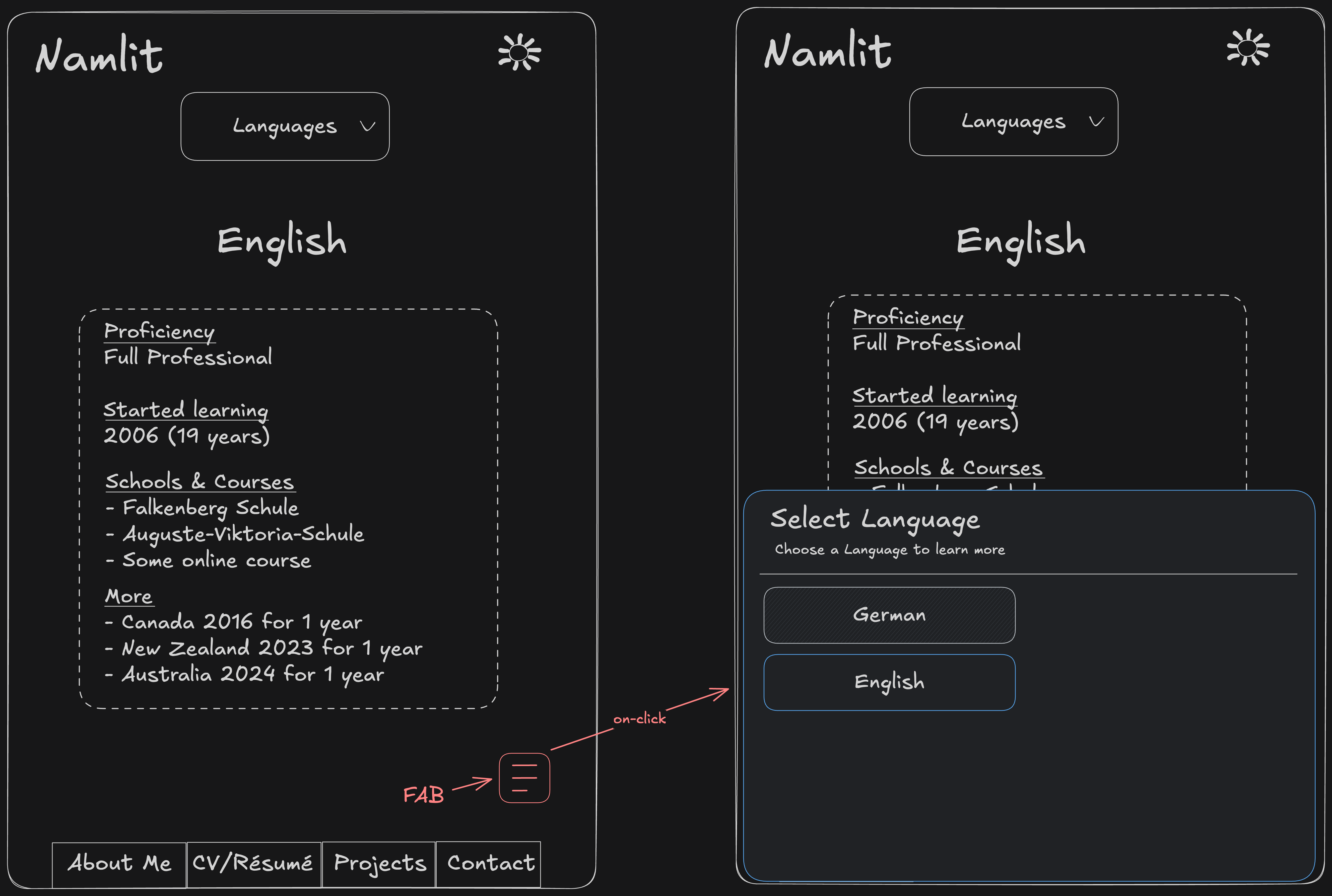
So instead I decided to implement the same FAB (Floating Action Button) that pulls up a Bottom Sheet like in the Techstack and Project Post, or whenever there is a Nested Navigation:
The difference compared to other pages with a Nested Navigation, is that this one uses Query Parameters to identify which language-content is currently displayed.
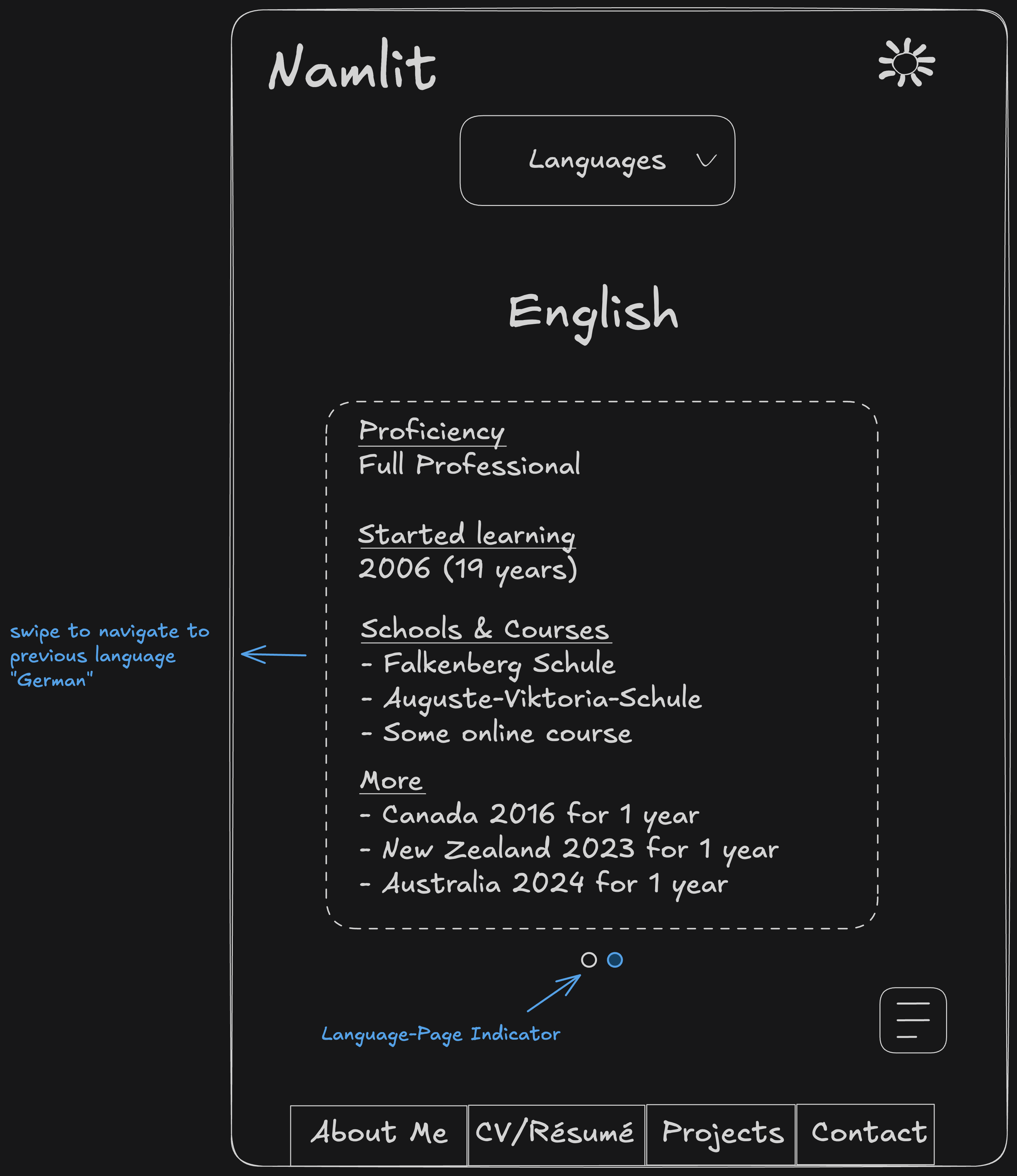
I also wrapped the content inside a Carousel. Now you can swipe left/right to switch between the languages:
Code
You will be able to find the code on my GitHub in the near future! First I have to get everything cleaned up tho before uploading v1.0.
Feel free to reach out if you have questions related to the design, coding and more anytime! I'd be happy to go over the code in my private GitLab too, while I haven't uploaded it here yet :)
Languages in a CV are usually just an enumeration of what you know and that's it.
It would be pretty pointless if I only display "German" and "English" on this page. So instead, I'm adding extra information for each language:
- Proficiency
- When I started learning (left out atm)
- Schools & Courses
- More details to point out things like a gap year for example
Sketch
The desktop view is very similar to the one in the Techstack
and Project Post. It features
a Nested Navigation on the left side and displays the
content in the middle:
Using a Nested Navigation isn't really necessary. But it was easy enough to implement and keeps navigation types on my website consistent!
Mobile view
For the mobile version I had something like this in mind:
Since I only speak German and English (wish it'd be more), it is fine to have a couple buttons above the content to
navigate.
However, this would be a completely different navigation type to the other ones already implemented on the website. And
having a bunch of different navigations is a bad practice in my opinion.
Additionally, this layout causes complications if I were to extend my website with a user creation. There are some crazy people speaking 7+ languages out there. At that point, having a button-row wouldn't even make sense in the desktop view anymore :D
So instead I decided to implement the same FAB (Floating Action Button) that pulls up a Bottom Sheet like in
the Techstack
and Project Post, or whenever there is
a Nested Navigation:
The difference compared to other pages with a Nested Navigation, is that this one uses Query Parameters to identify which language-content is currently displayed.
I also wrapped the content inside a Carousel. Now you can swipe
left/right to switch between the languages:
Code
You will be able to find the code on my GitHub in the near future! First I have to get everything cleaned up tho before uploading v1.0.
Feel free to reach out if you have questions related to the design, coding and more anytime! I'd be happy to go over the code in my private GitLab too, while I haven't uploaded it here yet :)
Languages Design
Languages in a CV are usually just an enumeration of what you know and that's it.
It would be pretty pointless if I only display "German" and "English" on this page. So instead, I'm adding extra information for each language:
- Proficiency
- When I started learning (left out atm)
- Schools & Courses
- More details to point out things like a gap year for example
Sketch
The desktop view is very similar to the one in the Techstack and Project Post. It features a Nested Navigation on the left side and displays the content in the middle:
Using a Nested Navigation isn't really necessary. But it was easy enough to implement and keeps navigation types on my website consistent!
Mobile view
For the mobile version I had something like this in mind:
Since I only speak German and English (wish it'd be more), it is fine to have a couple buttons above the content to
navigate.
However, this would be a completely different navigation type to the other ones already implemented on the website. And
having a bunch of different navigations is a bad practice in my opinion.
Additionally, this layout causes complications if I were to extend my website with a user creation. There are some crazy people speaking 7+ languages out there. At that point, having a button-row wouldn't even make sense in the desktop view anymore :D
So instead I decided to implement the same FAB (Floating Action Button) that pulls up a Bottom Sheet like in the Techstack and Project Post, or whenever there is a Nested Navigation:
The difference compared to other pages with a Nested Navigation, is that this one uses Query Parameters to identify which language-content is currently displayed.
I also wrapped the content inside a Carousel. Now you can swipe left/right to switch between the languages:
Code
You will be able to find the code on my GitHub in the near future! First I have to get everything cleaned up tho before uploading v1.0.
Feel free to reach out if you have questions related to the design, coding and more anytime! I'd be happy to go over the code in my private GitLab too, while I haven't uploaded it here yet :)
Languages in a CV are usually just an enumeration of what you know and that's it.
It would be pretty pointless if I only display "German" and "English" on this page. So instead, I'm adding extra information for each language:
- Proficiency
- When I started learning (left out atm)
- Schools & Courses
- More details to point out things like a gap year for example
Sketch
The desktop view is very similar to the one in the Techstack
and Project Post. It features
a Nested Navigation on the left side and displays the
content in the middle:
Using a Nested Navigation isn't really necessary. But it was easy enough to implement and keeps navigation types on my website consistent!
Mobile view
For the mobile version I had something like this in mind:
Since I only speak German and English (wish it'd be more), it is fine to have a couple buttons above the content to
navigate.
However, this would be a completely different navigation type to the other ones already implemented on the website. And
having a bunch of different navigations is a bad practice in my opinion.
Additionally, this layout causes complications if I were to extend my website with a user creation. There are some crazy people speaking 7+ languages out there. At that point, having a button-row wouldn't even make sense in the desktop view anymore :D
So instead I decided to implement the same FAB (Floating Action Button) that pulls up a Bottom Sheet like in
the Techstack
and Project Post, or whenever there is
a Nested Navigation:
The difference compared to other pages with a Nested Navigation, is that this one uses Query Parameters to identify which language-content is currently displayed.
I also wrapped the content inside a Carousel. Now you can swipe
left/right to switch between the languages:
Code
You will be able to find the code on my GitHub in the near future! First I have to get everything cleaned up tho before uploading v1.0.
Feel free to reach out if you have questions related to the design, coding and more anytime! I'd be happy to go over the code in my private GitLab too, while I haven't uploaded it here yet :)
Languages Design
Languages in a CV are usually just an enumeration of what you know and that's it.
It would be pretty pointless if I only display "German" and "English" on this page. So instead, I'm adding extra information for each language:
- Proficiency
- When I started learning (left out atm)
- Schools & Courses
- More details to point out things like a gap year for example
Sketch
The desktop view is very similar to the one in the Techstack and Project Post. It features a Nested Navigation on the left side and displays the content in the middle:
Using a Nested Navigation isn't really necessary. But it was easy enough to implement and keeps navigation types on my website consistent!
Mobile view
For the mobile version I had something like this in mind:
Since I only speak German and English (wish it'd be more), it is fine to have a couple buttons above the content to
navigate.
However, this would be a completely different navigation type to the other ones already implemented on the website. And
having a bunch of different navigations is a bad practice in my opinion.
Additionally, this layout causes complications if I were to extend my website with a user creation. There are some crazy people speaking 7+ languages out there. At that point, having a button-row wouldn't even make sense in the desktop view anymore :D
So instead I decided to implement the same FAB (Floating Action Button) that pulls up a Bottom Sheet like in the Techstack and Project Post, or whenever there is a Nested Navigation:
The difference compared to other pages with a Nested Navigation, is that this one uses Query Parameters to identify which language-content is currently displayed.
I also wrapped the content inside a Carousel. Now you can swipe left/right to switch between the languages:
Code
You will be able to find the code on my GitHub in the near future! First I have to get everything cleaned up tho before uploading v1.0.
Feel free to reach out if you have questions related to the design, coding and more anytime! I'd be happy to go over the code in my private GitLab too, while I haven't uploaded it here yet :)
Languages in a CV are usually just an enumeration of what you know and that's it.
It would be pretty pointless if I only display "German" and "English" on this page. So instead, I'm adding extra information for each language:
- Proficiency
- When I started learning (left out atm)
- Schools & Courses
- More details to point out things like a gap year for example
Sketch
The desktop view is very similar to the one in the Techstack
and Project Post. It features
a Nested Navigation on the left side and displays the
content in the middle:
Using a Nested Navigation isn't really necessary. But it was easy enough to implement and keeps navigation types on my website consistent!
Mobile view
For the mobile version I had something like this in mind:
Since I only speak German and English (wish it'd be more), it is fine to have a couple buttons above the content to
navigate.
However, this would be a completely different navigation type to the other ones already implemented on the website. And
having a bunch of different navigations is a bad practice in my opinion.
Additionally, this layout causes complications if I were to extend my website with a user creation. There are some crazy people speaking 7+ languages out there. At that point, having a button-row wouldn't even make sense in the desktop view anymore :D
So instead I decided to implement the same FAB (Floating Action Button) that pulls up a Bottom Sheet like in
the Techstack
and Project Post, or whenever there is
a Nested Navigation:
The difference compared to other pages with a Nested Navigation, is that this one uses Query Parameters to identify which language-content is currently displayed.
I also wrapped the content inside a Carousel. Now you can swipe
left/right to switch between the languages:
Code
You will be able to find the code on my GitHub in the near future! First I have to get everything cleaned up tho before uploading v1.0.
Feel free to reach out if you have questions related to the design, coding and more anytime! I'd be happy to go over the code in my private GitLab too, while I haven't uploaded it here yet :)